Ask a general AI chatbot about your company's revenue and it will often give you a number. The number may look plausible. It may be formatted well. It may also be invented, because the model has never seen your accounts and is filling the gap with something that sounds right.
For a marketing draft, that is an annoyance. For an invoice total, a VAT figure or a balance sheet line, it is a real risk. This article explains why grounded answers with citations reduce that risk and how to check whether a tool actually delivers them.
Key takeaways
- Language models predict likely text. Without your documents, they can produce plausible but wrong figures.
- Grounding means the answer is built from passages retrieved from your own files.
- A citation names the file and, where possible, the page, so a person can verify the figure.
- Test any tool with questions whose answers you know, and with questions that have no answer.
Why AI tools make up numbers
A large language model is trained to produce likely text. It does not look up facts unless the system around it makes it do so. When asked a question it cannot answer from what it has been given, it may still produce a fluent reply. This is often called hallucination.
Numbers are especially exposed. A model knows what a revenue figure looks like. It does not know your revenue. Without a source, the answer "Revenue was €1.2m" is a guess with good formatting.
Finance work makes the problem worse in three ways:
- Small differences matter. A wrong digit in a VAT amount is an error, not a rounding issue.
- Periods are easy to mix up. Statements often show this year and last year side by side.
- Figures travel. A wrong number in an email to a client or a board report is hard to take back.
What grounding and citations mean
A grounded system, often built with retrieval-augmented generation (RAG), works in two steps. First it searches your own documents for passages that match the question. Then the model writes an answer using only those passages. If nothing relevant is found, the right answer is "I could not find that".
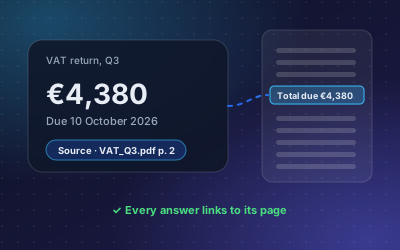
A citation is the visible part of grounding. It tells you which document, and ideally which page, the answer came from:
Question: How did our revenue change from 2023 to 2024?
Answer: Revenue rose from €1.21m to €1.38m, an increase of about 14 %.
Source: Annual_Statement_2024.pdf, p. 5
Now the answer is checkable. Open page 5, find the two figures, done. Without the citation, someone would need to search the statement from scratch to trust it, which removes most of the time saved.
Grounding is necessary, but structure helps with numbers
Retrieval over plain text works well for contracts, policies and letters. For tables of numbers it has limits. A balance sheet split into text chunks can lose the link between a figure and its column or period.
That is why finance tools benefit from structured extraction. Invoices and statements are read into fields and line items: supplier, date, net, VAT, gross, or each line of a profit and loss statement for each period. Answers then come from those fields, and comparisons between periods use the matching lines.
In DoclyChat, this is the Financial Data add-on. It extracts invoices, balance sheets and profit and loss statements and supports cross-period comparisons. Every answer still cites the source document. See the invoicing and finance use case for examples.
How to evaluate any tool
You do not need to trust a vendor's claims, including ours. Run a short test with your own files.
- Build a test set. Take 15 to 20 questions with known answers from real invoices and statements. Include at least three that compare two periods.
- Add questions with no answer. Ask for a figure that is not in any connected file. A grounded tool should say it cannot find it. A guess is a fail.
- Check every citation. Open the cited file and page. Does the figure appear there? A citation that points to the wrong place is almost as bad as none.
- Change a document. Replace a statement with a corrected version and ask again after the sync. The answer should follow the new file.
- Test permissions. Ask as a user who should not see a file. The tool must not cite it. See multi-tenant permissions explained.
- Score honestly. Count correct with correct source, correct without source, wrong, and correct "not found".
| Behaviour | Acceptable for finance work? |
|---|---|
| Correct figure, citation to the right page | Yes |
| "Not found" when the data is missing | Yes |
| Correct figure, no citation | No: nobody can verify it quickly |
| Plausible figure that is not in any file | No: this is the failure grounding should prevent |
Questions to ask a vendor
A demo on the vendor's own sample files tells you little. These questions get closer to how the tool behaves on yours:
- Does every answer show its source? Or only some answers, or only when you ask for it?
- What happens when nothing relevant is found? Ask to see it, not just hear about it.
- Can the model fall back on general knowledge? For company figures, it should not.
- How are invoices and statements read? As plain text chunks, or as structured fields and line items?
- How quickly do changes show up? Ask how often connected sources sync and how you can check the last sync.
- Do permissions apply to the search itself? A citation to a file the user may not open is a leak.
Write the answers down and compare them with what you see in your own test. Where the two differ, trust the test.
Habits that keep answers trustworthy
Even with a grounded tool, a few habits help:
- Click the source before you send. Make it a rule for any figure that leaves the team.
- Keep one version of each document. Duplicate statements with different figures confuse any system.
- Ask precise questions. "Revenue in the 2024 annual statement" is better than "how much did we make".
- Report wrong answers. Each one usually points to a document problem you can fix.
How DoclyChat approaches it
DoclyChat answers from the files you connect, and every answer links to the document, page or invoice it came from. It does not answer from general web knowledge about your company. When the answer is not in your files, it says so.
Accounting teams can see sector examples on the accounting and bookkeeping page. To run the test above on your own statements, create a free account. No credit card is needed.