Accounting and bookkeeping firms answer the same kinds of questions every week. Which invoices are still open? What did the client pay for insurance last year? Where is the signed engagement letter? The answers already sit in your files. The work is finding them, checking them and passing them on.
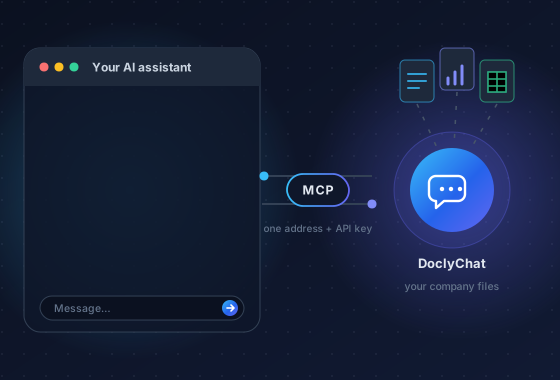
A company chatbot can do the finding part. It reads the documents you connect, answers in plain language and points to the file and page behind each answer. This guide explains where that helps a firm, where it does not, and what to test before you put client data into any tool.
Key takeaways
- Use a chatbot to find and quote facts from your files, not to make judgement calls that need a qualified accountant.
- Every answer about a number should show its source document, so staff can check it in seconds.
- Client data must stay separated per client. Test this yourself before rollout.
- Start with one team and a small set of real questions, then widen.
Where a chatbot helps an accounting firm
The best tasks are lookups that take a person a few minutes each but happen dozens of times a week. Typical examples:
- Client questions about their own records. "Did you receive our March bank statement?" or "What was our total for office rent last year?"
- Open and overdue invoices. Listing which invoices for a client or job are still unpaid, with amounts and due dates.
- Financial statements. Pulling a line item from a balance sheet or profit and loss statement, and comparing it with the previous period.
- Internal procedures. Month-end checklists, VAT calendars, onboarding steps for new staff.
- Finding documents. Contracts, engagement letters, insurance certificates and correspondence, with the folder they are filed in.
Here is the kind of exchange that works well:
Question: Which invoices for the Durach heating job are still open?
Answer: Two invoices are open: INV-2051 (€1,860.00, due 5 Nov) and INV-2058 (€640.00, due 19 Nov). The rest is paid.
Source: Invoices, Durach heating job
The answer is short, it names the documents, and anyone can open the source to confirm it. That is the standard to hold any tool to.
Invoices and financial statements need structure, not just search
Plain text search is fine for policies and letters. It is weak for numbers. A PDF invoice has a supplier, a date, line items, net, VAT and gross amounts. A balance sheet has hundreds of line items over two or more periods. If a tool only splits these files into text snippets, it can mix up columns or periods and still sound confident.
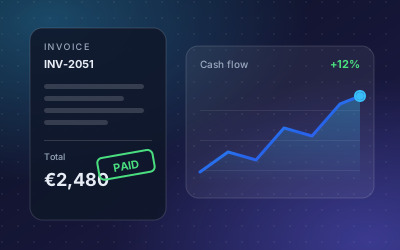
A better approach is structured extraction: the tool reads the invoice or statement into fields and line items, then answers from those fields. In DoclyChat this is the Financial Data add-on. It extracts invoices, balance sheets and profit and loss statements, and supports comparisons across periods, such as revenue this year against last year. See the invoicing and finance use case for examples.
Whatever tool you look at, ask to see an answer that compares two periods and check both figures against the original statement by hand.
Per-client isolation is the first thing to check
An accounting firm holds data for many clients. A chatbot that searches everything at once is a liability: one careless question could surface another client's figures. Isolation has to work at two levels.
- Between clients. Each client's files form a separate space. A question asked in one client's context must never draw on another client's documents.
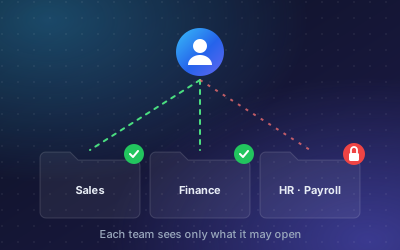
- Inside the firm. Not every employee should see payroll, partner documents or every client. Access should follow folders, files and roles.
DoclyChat is multi-tenant by design, with per-folder and per-file access control, so each client and team sees only its own data. For firms that run their own client portal, each client can also get a fully separate tenant with its own knowledge base. We explain the reasoning in multi-tenant permissions explained.
A simple test before you buy: set up two test clients with similar documents, for example two invoices with different amounts. Ask about one client while signed in as the other. The only acceptable answer is that the information is not available.
What to check before you buy
Use this list when you compare tools. It applies to any vendor, not only us.
| Check | Why it matters | How to test it |
|---|---|---|
| Citations on every answer | Staff must be able to verify a figure before it goes to a client. | Ask ten real questions. Every answer should name a file and, where possible, a page. |
| Client separation | Mixing clients is a confidentiality breach. | Ask about client A while working as client B. |
| Honest "not found" | A guessed number is worse than no answer. | Ask for a figure you know is not in the files. |
| Sync with your storage | Answers from last month's version of a file are wrong answers. | Replace a document and ask again after the sync. |
| Usage and cost visibility | You need to know who uses it and what it costs. | Look for usage reports per team or department. |
| Language | Clients and staff may ask in German or English. | Ask the same question in both languages. |
Also ask where the data is stored and processed, how long it is kept, and how you delete a client's data when the engagement ends. Your data protection obligations do not change because a tool is involved.
What a chatbot should not do
Be clear with your team about limits. A chatbot that finds facts is useful. A chatbot that gives tax or accounting advice without a professional in the loop is a risk. Good boundaries:
- It quotes and compares figures from documents. A person decides what they mean for the client.
- It finds the relevant clause or policy. A person interprets it.
- It drafts a reply. A person checks the numbers against the source and sends it.
Write these rules down and include them in onboarding. It keeps expectations realistic and protects the firm.
A rollout plan for a small firm
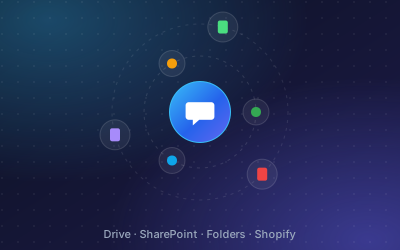
- Pick one team and one source. For example the bookkeeping team and the shared Google Drive or SharePoint folder for three clients.
- Collect 20 real questions. Take them from emails and calls of the last month. Write down the correct answer and the source for each.
- Connect and wait for indexing. Then ask all 20 questions and score them: correct with source, correct without source, wrong, or "not found".
- Fix the files, not the questions. Wrong answers often come from duplicate versions, scanned pages with poor quality, or files in the wrong folder.
- Set permissions. Check the client separation test above with real accounts.
- Widen slowly. Add clients and teams once the first group trusts the answers.
Firms that want to offer answers to clients directly can place the chat widget on a client portal or intranet later. Start internally first, so your team learns how the tool behaves.
Next steps
If you run an accounting or bookkeeping practice, our accounting and bookkeeping page shows example questions for this sector. You can compare plans on the pricing page, or start free with no credit card and run the 20-question test on your own files.