A chatbot that answers from company files is only safe if it knows whose files it may use for each question. That sounds obvious. In practice, many setups get it wrong in a quiet way: the interface hides restricted folders, but the search behind the chatbot still reads them.
This article explains the terms, the common mistake, and how to test any tool, including ours.
Key takeaways
- A tenant is one isolated customer space: its own files, users and settings.
- Inside a tenant, folder and file permissions decide what each user may see.
- Permissions must apply when the chatbot retrieves passages, not only in the menus people click.
- Test isolation yourself with questions that should return nothing.
The two levels of access control
Tenants: one business, one space
Multi-tenant software serves many customers from one system. Each customer, called a tenant, has its own data, users and settings. An accounting firm, a property manager and a web shop can all use the same product without ever seeing each other's files.
Tenants matter even inside one company. A firm that manages data for many clients may want each client in its own tenant. DoclyChat supports this: a partner platform can provision a fully separate tenant for each client, with its own knowledge base and its own credits.
Folder and file permissions: who sees what inside a tenant
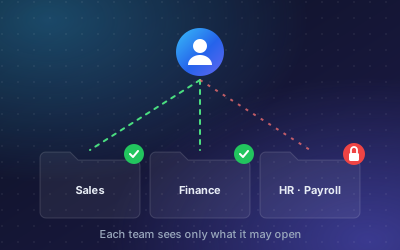
Inside one tenant, not everyone needs everything. Sales should not read payroll. An external tax adviser may need invoices but not HR files. DoclyChat applies per-folder and per-file access control so each team and client only sees its own data.
| Level | Separates | Example |
|---|---|---|
| Tenant | Businesses or clients | Client A's statements never appear in client B's answers. |
| Folder | Teams or functions | The payroll folder is limited to HR and management. |
| File | Single documents | One confidential contract inside an otherwise shared folder. |
Why permissions in the interface are not enough
Most AI chatbots that answer from documents use a method called retrieval-augmented generation, or RAG. When you ask a question, the system first searches your documents for relevant passages. Then a language model writes an answer from those passages.
The risk sits in the first step. Suppose the interface hides the payroll folder from a sales user, but the search index contains every file in the tenant. The sales user asks, "What is the average salary in the warehouse team?" The search finds a passage from a payroll file. The model writes a helpful answer. The user never opened the folder, but they got its contents anyway.
That is why permissions must apply at retrieval time. Before any passage reaches the language model, the system must filter by tenant and by the user's access rights. If a passage is not allowed, the model never sees it and cannot leak it.
Two related points:
- Prompts are not a security boundary. An instruction like "do not reveal payroll data" can be talked around. A filter on the search results cannot.
- Every route needs the same rules. If the same data is reachable through a website widget, an intranet chat and an API or MCP connection, each route must apply the same filters. DoclyChat's MCP server answers only from what the connecting account may see.
What good isolation looks like in practice
A permission-aware chatbot should answer "not available" when the user lacks access, and it should do so without hinting at what the restricted file contains.
Question: Can our tax adviser read the invoices?
Answer: Yes. Add the adviser under Settings → Team with the 'Finance (read only)' role. They can open invoices but cannot change them.
Source: Setup guide, Team roles
The answer is useful because it reflects the real access model. The adviser gets what the role allows and nothing else. See the team data access use case for more examples.
Where this matters most
- Accounting and tax firms hold financial data for many clients. A mix-up is a confidentiality breach. See accounting and bookkeeping.
- Law firms must keep matters apart, often within the same client.
- HR teams handle salaries, health information and performance reviews that only a few people may read.
- Agencies and platforms that build on a chatbot for their own clients need hard separation between those clients.
Under the GDPR, companies must protect personal data with appropriate technical and organisational measures and limit access to people who need it. A chatbot that bypasses folder rules works against both.
How to test any tool
Run these checks before you connect real client data. They take under an hour.
- Create two test tenants or clients with similar documents but different figures, such as two invoices with different totals.
- Cross-ask. Signed in as client A, ask for client B's invoice total. The correct result is nothing.
- Test a restricted folder. Put a test file with a unique phrase in a restricted folder. As a user without access, ask a question that matches that phrase. The phrase must not appear.
- Remove access and ask again. Give a user access, ask a question, then remove access and repeat. The second answer must not use the file.
- Repeat over every route. Run the same tests in the widget and through any API or MCP connection.
- Ask the vendor directly whether permissions are applied when passages are retrieved, or only in the interface.
Common mistakes to avoid
- Connecting everything at once. A whole shared drive often contains forgotten folders with salary lists, old HR cases or personal files. Connect folders on purpose, one by one.
- Copying files into a shared "AI folder". It feels tidy, but the copies lose the permissions of the original folders. Connect the source folders instead, so access rules stay where they are maintained.
- One account for everyone. If the whole team signs in with one shared login, the tool cannot tell users apart, and per-user permissions mean nothing.
- Forgetting leavers. When someone leaves or changes role, remove or change their access in the chatbot too. Rotate any API keys they used.
- Treating external users like staff. Advisers, contractors and clients usually need read-only access to a few folders, not team membership.
Most of these are process problems, not software problems. Write the rules down and review them when your team changes.
How DoclyChat handles it
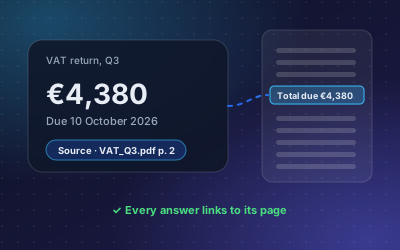
DoclyChat is multi-tenant by design. Each business has its own knowledge base, and per-folder and per-file access control decides what each team and client can get answers from. Every answer cites its source, so you can see exactly which file an answer used and confirm it was one the user may open.
Multi-tenant permissions are part of the Business plan. Compare plans on the pricing page, or start free and run the tests above on your own sample files.