The problem: one chatbot, many people, different rights
Putting all company files behind one chatbot sounds simple. Then the first question comes in: should the sales team be able to ask about salaries? Should an outside tax adviser see contracts? Should one client of an accounting firm ever see a document from another client?
Many AI tools treat everything you upload as one pool. That works for a single person. It does not work for a company where payroll, HR files, client folders and management reports must stay separate.
The usual workaround is to build several chatbots, one per team, and copy files between them. That is extra work, it gets out of date quickly, and it still fails the first time someone needs files from two areas.
How DoclyChat handles it
DoclyChat was built multi-tenant from the start. Access control is part of how answers are found, not a filter added at the end.
- Per-folder and per-file permissions. You decide which teams can see which folders, down to single files.
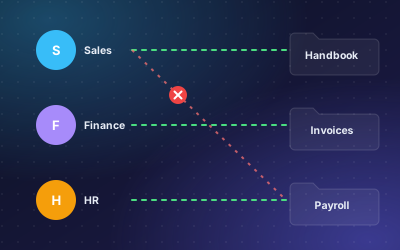
- Answers only from allowed files. When someone asks a question, DoclyChat only searches what that person may see. A question about payroll from a sales account gets no payroll content.
- Separate tenants for separate clients. Firms that serve many clients can keep each client's data in its own space, so one client never sees another's files.
- The same rules everywhere. Whether someone asks in the web app, through the chat widget on your intranet, or from ChatGPT or Claude through the MCP connector, the answers come only from what that account may see.
- Usage and cost tracking. See how the chatbot is used and what it costs per team and per department.
For a deeper look at how tenants, folders and files fit together, read multi-tenant permissions explained.
A worked example
A new sales manager wants to check a few things in his first week.
Question: Can the sales team see the payroll folder?
Answer: No. The payroll folder is limited to HR and management. Sales can see only the customer folders assigned to them.
Source: Folder permissions, Payroll
Question: Where do I find the employee handbook?
Answer: The employee handbook is under Company → Policies → Employee handbook 2026 and is available to all staff.
Source: Company policies
The first answer tells him what he cannot open and why. The second points him to a file he can. In both cases he did not need to ask IT.
How to set it up
- List your teams and the folders each one needs. Keep it short: most companies need four to six groups.
- Mark the sensitive areas first: payroll, HR, management reports and any client data.
- Create a free account and connect your sources: Google Drive, SharePoint, local folders, WordPress or manual uploads.
- Set folder and file permissions to match your list.
- Test with two accounts from different teams. Ask the same question from both and compare the answers and sources.
- Invite the rest of the team once the test accounts behave as expected.
- Review usage per team after the first weeks to see who uses it and for what.
Who it suits
- Companies with sensitive internal areas such as HR, payroll or management finance.
- Firms that serve many clients, for example accounting and bookkeeping firms, where client data must never mix.
- Organisations that work with outside partners who need some folders but not all of them.
What to watch out for
- Permissions follow your setup. If a confidential file sits in a folder everyone can see, the chatbot treats it as visible to everyone. Tidy the folder structure first.
- Test before rollout. Two test accounts and ten questions catch most mistakes.
- Treat MCP links and API keys like passwords. Anyone who has the connector link can ask the account it belongs to. If one leaks, regenerate the key in Settings.
- Multi-tenant permissions depend on the plan. Check the pricing page to see which plan includes them.
Next step
Start with one sensitive folder and one open folder, and test the difference between two accounts. That one test shows you how the whole setup will behave. Create a free account to try it with your own files.