The problem: the same five questions, every day
Ask any shop support team which questions they answer most and the list is short. Do you ship to my country? How much is shipping? How long does delivery take? Can I return this? Do sale items have a different return window?
The answers are already written down on your shipping, returns and FAQ pages. Shoppers do not find them, or do not want to read a full policy page for one detail. So they email, and your team copies the same paragraph into a reply.
These questions also tend to come at the moment of decision. A shopper who is unsure about returns may wait, and a shopper who waits often does not come back.
How DoclyChat handles it
- Answers from your policy pages. DoclyChat syncs your shop pages and blog articles, including shipping, returns and other policy pages.
- Short answer, full source. The shopper gets the one detail they asked for, with the policy page cited so they can read the rest.
- Same chat as product questions. A shopper can ask about a product, its stock and the return window in one conversation.
- Kept in sync. When you update a policy page, the next sync brings the new version into the answers.
- English and German. Shoppers can ask in either language.
- See what people ask. Conversations show which policy questions come up most, which tells you where your pages need to be clearer.
A worked example
A shopper has a sale item in the cart and hesitates.
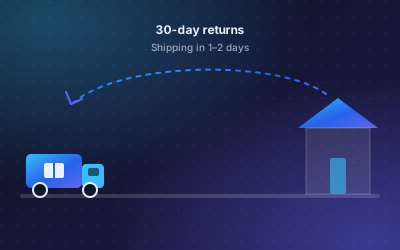
Question: What is your return window for sale items?
Answer: Sale items can be returned within 30 days, the same as full-price items.
Source: Returns policy page
The answer is short and the source is the page the shop already published. The shopper does not need to email, and the support team does not need to reply.
If the returns page did not mention sale items, the assistant would not be able to give a clear answer. That gap is worth closing on the page itself, because shoppers who read the page have the same question.
How to set it up
- Review your shipping, returns and FAQ pages. Make sure they state the rules clearly, including exceptions such as sale items or bulky goods.
- Create a free account. No credit card is needed.
- Connect your store. In Shopify, the DoclyChat app syncs pages and blog articles along with products. On WordPress, connecting the plugin links your public posts and pages.
- Switch on the chat widget.
- Ask the questions from your support inbox and compare the answers with what your team would write.
- Update any policy page where the answer was unclear, and ask again after the next sync.
Who it suits
- Shops that ship to several countries with different costs and times.
- Shops with return rules that differ by product type.
- Small teams that want to spend support time on real problems, not repeated policy questions. See e-commerce and retail.
What to watch out for
- Policy pages must be current. The assistant answers from what the page says. If the page is out of date, so is the answer.
- Order status is a different question. The Shopify app reads products and content only. It does not see orders, so "where is my parcel" still goes to your normal support channel.
- Write exceptions down. Rules that only exist in your team's heads cannot be answered.
- Pages count toward the Free plan limit. With a Shopify shop, the Free plan syncs up to 25 products, pages and articles in total. See the pricing page.
Questions to cover on your policy pages
- Which countries do you ship to, and what does shipping cost?
- How long does delivery take, and is there express shipping?
- How many days do I have to return an item, and who pays return shipping?
- Do sale items, custom orders or opened items have different rules?
If each of these has a clear sentence on a page, the assistant can answer it.
Next step
Take the five policy questions your team answers most and ask them in the chat. If the answers match your replies, switch the widget on for shoppers. Product questions work the same way; see product answers 24/7. Start free to try it with your own pages.