The problem: too many choices, not enough help
In a shop, a shopper standing in front of a shelf can ask a salesperson: which one is right for me? Online, they read three product pages, open a few tabs, and often leave without deciding.
Filters help when shoppers know the exact feature they want. They help less when the question is "Which blender suits a family of four?" or "What is the difference between these two backpacks?" Those questions need someone who knows the catalog.
Your team knows the catalog, but cannot answer every shopper at every hour.
How DoclyChat handles it
- Recommendations from your catalog. The shopper describes what they need, and the assistant suggests matching products from your synced catalog.
- Side-by-side comparisons. Ask for two products and get them compared by price, size, material and stock, taken from your product data.
- Links to the products. Answers link straight to the matching product pages, so the shopper is one click away from the product.
- Current price and stock. In a connected Shopify or WooCommerce store, price and stock are checked live, so a recommendation does not point to a sold-out item at an old price.
- Structured output for developers. Through the MCP connector, the /compare and /toplist commands return a fixed JSON shape instead of free text.
A worked example
A shopper is choosing a kitchen blender.
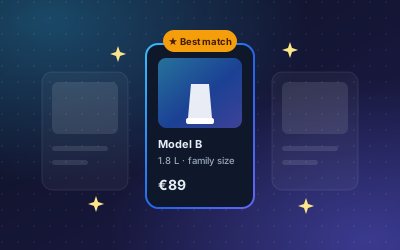
Question: Which blender suits a family of four?
Answer: Model B is the better fit. It has a 1.8 L jug, which is enough for four portions, and it is in stock at today's price.
Source: Product page, Model B; price and stock checked live
The shopper then asks for a comparison:
Question: Compare Model A and Model B.
Answer: Model A has a smaller jug and costs less. Model B has the 1.8 L jug. Both are in stock. Price, jug size, material and stock are listed side by side for each.
Source: Product pages, Model A and Model B
Every value in the answer comes from the product data. If a value is missing on a product page, the comparison cannot show it, which is a good reason to keep product data complete.
How to set it up
- Create a free account. No credit card is needed.
- Connect your store: the DoclyChat app for Shopify, or your WooCommerce store.
- Check that your products have clear sizes, materials and key specifications in the description or variants.
- Switch on the chat widget.
- Ask for recommendations the way a shopper would, for example "a gift under 50 euros" or "a backpack for a day hike", and review the results.
- Ask for comparisons between products that shoppers often confuse, and fill any gaps on those product pages.
Who it suits
- Shops with similar products that shoppers find hard to tell apart.
- Shops with technical specifications, where a comparison table saves reading.
- Shops where gift buyers do not know the product category well. See e-commerce and retail.
What to watch out for
- Recommendations follow your data. If two products have the same vague description, the assistant cannot tell them apart either.
- Use consistent units. Write sizes and volumes the same way across products, so comparisons line up.
- Keep the shopper in charge. A recommendation is a suggestion with a link. The shopper still reads the product page and decides.
- It works from what is synced. A product that is not in the synced catalog cannot be recommended.
- Sync limits on the Free plan. With a Shopify shop, the Free plan syncs up to 25 products, pages and articles, so recommendations only cover those. See the pricing page.
Good questions to test with
- Need-based: "Which tent is best for two people and light packing?"
- Budget-based: "What is a good gift under 50 euros?"
- Comparison: "What is the difference between the Alpine 30 and the Alpine 40?"
- Similar items: "Show me products similar to this backpack."
Run these against your own catalog. Where the answer is weak, the product page usually is too.
Next step
Pick the two products shoppers ask about most and ask the assistant to compare them. The result shows you quickly whether your product data is complete. Then start free and switch on the chat for your shoppers. For product questions in general, see product answers 24/7.